ERP User Manual
Gift Card List
The Gift Card submodule under the Sales module allows the business to issue, track, and manage prepaid cards that customers can redeem against future purchases. Gift cards enhance customer loyalty and provide an alternative payment method. This feature supports issuing cards to either registered customers or system users.
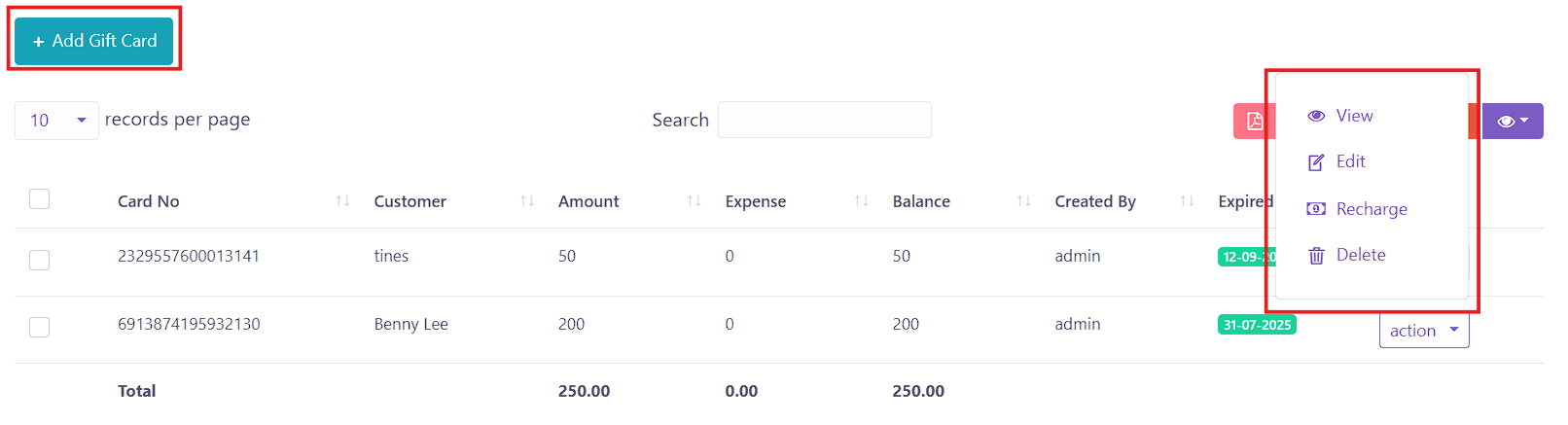 Figure XX: Gift Card List
 The Gift Card List page displays all issued gift cards in a DataTable format, offering a clear overview of balances, usage, and expiry. It includes the following columns:
Key Columns:
- Card No – Unique identifier of the gift card (can be system-generated).
- Customer – The recipient of the gift card (either registered customer or user).
- Amount – Total value loaded onto the card.
- Expense – Total amount already spent from the gift card.
- Balance – Remaining usable amount.
- Created By – The user who issued the gift card.
- Expired Date – The date after which the gift card becomes invalid.
- Action – Options to View, Edit, Recharge, or Delete the gift card.
To add a new gift card into the system, users can click the Add Gift Card button,
 located on the Gift Card
Index page. This will open a form where gift card details must be filled in.
located on the Gift Card
Index page. This will open a form where gift card details must be filled in.
 Figure XX: Add Gift Card Form
 The form includes:
- Card No – A unique card number that can be generated automatically or entered manually.
- Amount – The total value to be loaded on the gift card.
- Customer/User – Select whether the card is assigned to a Customer or a System User.
- Expired Date – Define the expiry date of the gift card.
Once submitted, the gift card will be added to the Gift Card List and made available for use during sales transactions.